








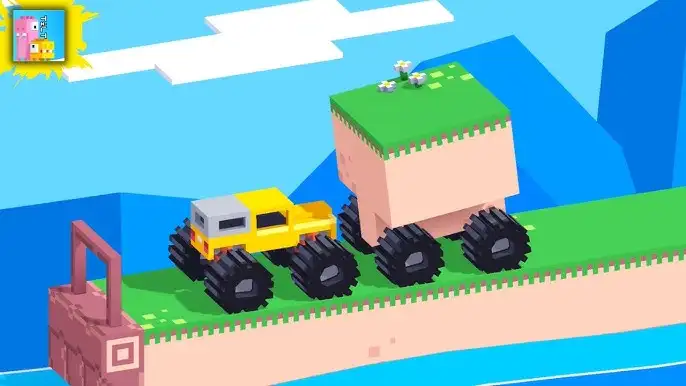


Drive Mad 3 Unblocked is the most difficult entry in Martin Magni’s Drive Mad series. Drive increasingly wild vehicles across ramps, rope bridges, gaps, and extreme terrain, keeping your ride balanced without flipping. One wrong move and you restart. No downloads, no account. Works on any browser, Chromebook, and mobile.

What Is Drive Mad 3?
Drive Mad 3 is a physics-based driving puzzle game developed by Martin Magni, the creator of the Fancade platform and the entire Drive Mad series, which has been played over 300 million times. It’s the third and hardest entry in the trilogy:
- Drive Mad — The original. Classic terrain, regular roads, the baseline introduction to the balance mechanic.
- Drive Mad 2 — Winter edition. Snowy, icy conditions that change how the vehicle grips and handles terrain.
- Drive Mad 3 — Built specifically for players who’ve mastered the first two. The terrain is more extreme, the obstacles are more creative, and the margin for error is smaller. This is the version for players who found the original too easy.
The core idea across all three is the same: get your vehicle to the end of each level without flipping over. No time limit, no racing against opponents, no score to chase. Just you, a vehicle, and a track designed to flip it. The game’s latest update was released in February 2025, adding a sound toggle option and fixing several bugs.

How to Play Drive Mad 3
- Press Right Arrow (or D) to accelerate forward. Your vehicle moves in the direction you’re driving.
- Press Left Arrow (or A) to brake or reverse. Use this to slow down before dangerous sections or to back up and get a better approach angle.
- Balance is everything. Speed gets you through flat sections. On ramps, bridges, and drops, speed is your enemy. The slower and more controlled your approach, the better your balance.
- Read the level name before you start. The level title almost always hints at the main obstacle — “Rope Bridge,” “First Gear,” “Big Air” — use it to prepare mentally for what’s coming.
- Reach the finish line without flipping over. Land on your wheels, keep moving forward, and don’t tip. That’s the game.
- Restart instantly. If you flip, press restart immediately and try a different approach. There’s no penalty for retrying.
Controls
| Action | Desktop | Mobile |
|---|---|---|
| Accelerate forward | Right Arrow or D | Tap the right side of the screen |
| Brake / Reverse | Left Arrow or A | Tap the left side of the screen |
| Pause | ESC | Pause button on screen |
The Vehicle System — What Makes Drive Mad 3 Different
One of the most misunderstood things about Drive Mad 3 is how vehicles work. You don’t unlock or choose vehicles — the game assigns a different vehicle to each level automatically. When you complete a level, the next one gives you a new vehicle. Every time you advance, the tires, speed, weight, and look change without you doing anything. This keeps every level feeling fresh because a vehicle that handled well on the previous level might be completely different to manage on the next one.
The vehicle types vary significantly — you might be driving a chunky 4×4 truck on one level and something with completely different weight distribution on the next. The game doesn’t tell you how the new vehicle behaves before you start; part of the challenge is feeling out the vehicle’s handling in the first few seconds of each attempt.

Obstacles and Level Types
Drive Mad 3 has more extreme and creative obstacles than the previous two entries. Here’s what you’ll encounter:
- Ramps and jumps — The most common obstacle type. The challenge is controlling your air time and landing angle. Going too fast launches you too high; coming down at the wrong angle flips you on impact.
- Rope and floating bridges — Suspended bridges that sway and flex as you drive across them. Your vehicle’s weight affects how much they move. Steady, controlled speed is the only way through.
- Gaps — Jumps across empty space. You need exactly enough speed to clear the gap without landing at an angle that tips the vehicle.
- Steep slopes and sharp turns — Inclines that require steady acceleration without the rear wheels losing grip. Sharp turns that tip the vehicle if you enter too fast.
- Moving platforms — Platforms that shift while you’re on them, requiring split-second adjustment to stay balanced.
- Water hazards — Hit water and the level resets. These are often positioned at the bottom of ramps or drops as an immediate consequence for bad landings.
- Exploding bridges — Some bridges are designed to collapse or explode, forcing you to cross them before they fail or time your crossing perfectly.

Tips and Tricks
- Slow down before obstacles, not during them. The instinct is to slow down when you see something scary mid-approach. By then it’s usually too late. Slow down earlier — before you reach the obstacle — and you’ll have much more control going through it.
- Read the level name. Martin Magni names every level to hint at the main challenge. A level called “Rope Bridge” tells you to slow down for a swaying bridge. “Big Air” tells you there’s a major jump. Use the name to prepare before you hit Play.
- Control landing angle in the air. When you’re airborne, use the accelerate and reverse controls to tilt the vehicle’s nose up or down. Tilting nose-up before landing means the rear wheels hit first — safer for most landings. Nose-down means the front hits first — riskier.
- Feel out each new vehicle in the first second. Every level gives you a different vehicle. Before you go anywhere, tap the accelerate key once or twice lightly to feel how responsive and heavy the new vehicle is. This two-second adjustment saves multiple crashes later in the level.
- Restart instantly and without ego. Drive Mad 3 expects you to fail levels multiple times. The restart button exists for a reason. If an approach isn’t working after two or three tries, try a completely different speed or line through the obstacle — not the same thing faster.
- Gravity controls matter in the air. On ramp-heavy levels, your time in the air is longer than it looks. Using slight accelerate/reverse inputs while airborne to adjust your angle before landing is one of the highest-impact micro-skills in the game.
- Bridges: lightest touch wins. On rope and floating bridges, aggressive acceleration bounces the bridge and creates unpredictable movement under your vehicle. The lightest possible constant pressure through the bridge is almost always faster than a burst-and-brake approach.
- Use reverse to reset balance. If your vehicle is tipping forward but hasn’t flipped yet, a quick reverse input can pull the rear back down and save the run. This window is short — but it works.

Drive Mad 3 vs Drive Mad 1 and 2
If you’ve played the earlier entries and found them manageable, Drive Mad 3 will feel meaningfully harder. The terrain is more varied and more extreme, the obstacle combinations require more precise vehicle control, and the levels are designed with the assumption that you already understand the balance fundamentals. Players who come to Drive Mad 3 without having played the first two will find it harder to learn because there’s less gradual difficulty ramping at the start.
If Drive Mad 3 is too punishing, the original Drive Mad is a great starting point — same controls, same mechanic, but the difficulty curve is much more forgiving for the first dozen or so levels.
Frequently Asked Questions
What is Drive Mad 3?
A physics-based driving puzzle game by Martin Magni where you drive vehicles across extreme terrain — ramps, rope bridges, gaps, and slopes — without flipping over. It’s the most difficult entry in the three-game Drive Mad series.
Who made Drive Mad 3?
Martin Magni, the developer behind the Fancade platform and the entire Drive Mad series. The Drive Mad games have been played over 300 million times across all versions.
How are vehicles chosen in Drive Mad 3?
The game assigns a different vehicle to each level automatically — you don’t unlock or choose them. Every new level changes the vehicle’s shape, weight, tires, and handling. Part of each level’s challenge is adapting to the new vehicle’s behavior.
What are the controls?
Right Arrow or D to accelerate forward. Left Arrow or A to brake or reverse. On mobile, tap the right side of the screen to go and the left side to slow down or reverse.
How is Drive Mad 3 different from Drive Mad 1 and 2?
Drive Mad 3 is the most difficult of the three. Drive Mad 1 features classic terrain, Drive Mad 2 uses winter and snowy conditions, and Drive Mad 3 has the most extreme obstacles and challenging track designs — built for players who’ve already mastered the first two games.
Is there a time limit?
No. Drive Mad 3 has no timer. You can take as long as you need on each level and restart as many times as you want. The only goal is reaching the finish line with your vehicle upright.
When was Drive Mad 3 last updated?
The most recent update across the Drive Mad series was in February 2025, adding a sound toggle option and fixing several bugs for smoother gameplay.
Can I play Drive Mad 3 on mobile?
Yes. Drive Mad 3 works on mobile browsers with touch controls — tap the right side of the screen to accelerate and the left side to brake or reverse.
What happens when I flip the vehicle?
The level resets and you restart from the beginning of that level. There are no lives — you can restart instantly and as many times as needed.
Why isn’t Drive Mad 3 loading?
Check your connection, make sure this site isn’t blocked, and try disabling ad blockers.
DrivingPuzzle